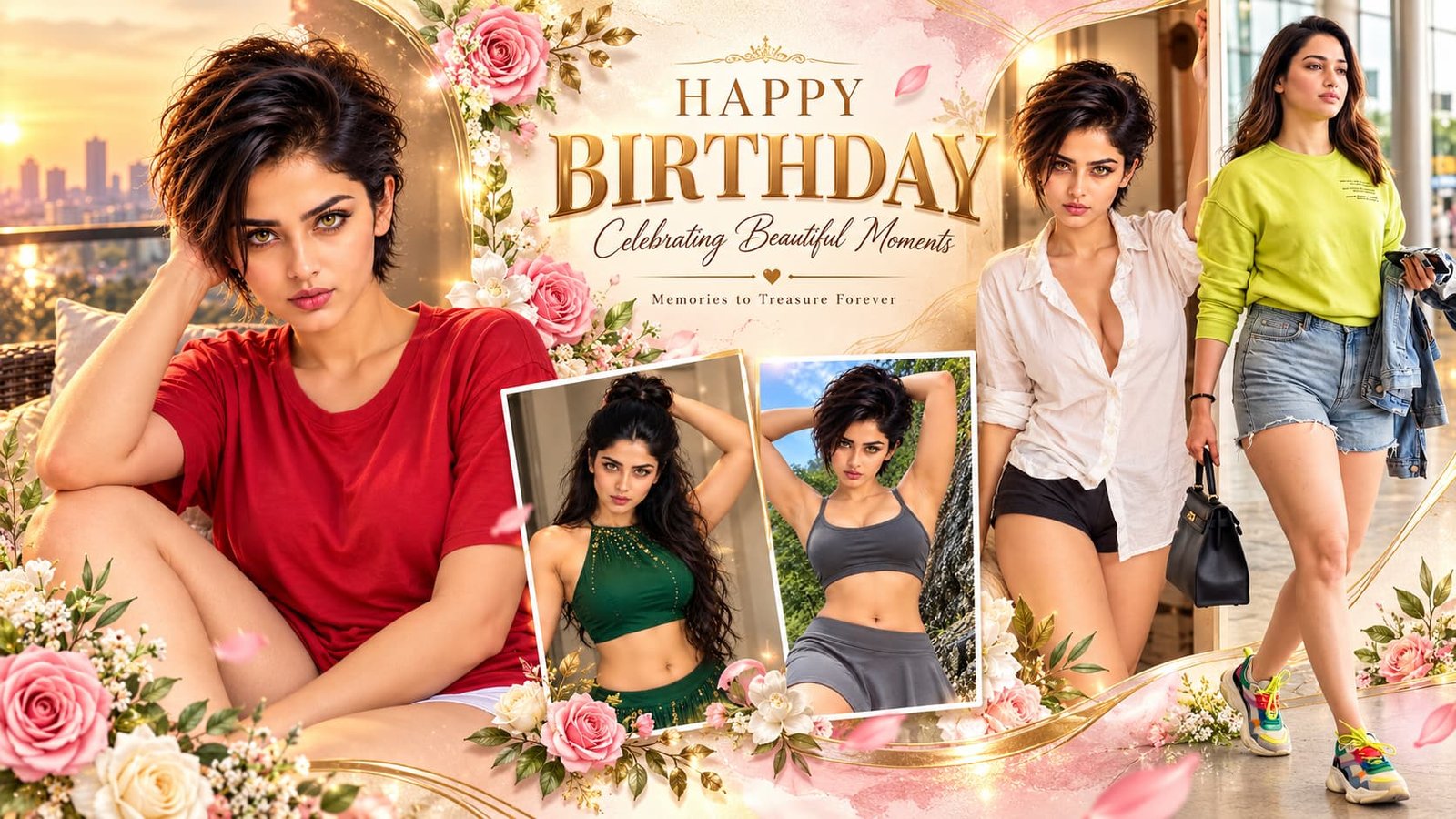
AI Birthday Calendar Poster Prompt తో మీ పేరు, పుట్టిన తేదీతో బర్త్డే పోస్టర్ తయారు చేయండి
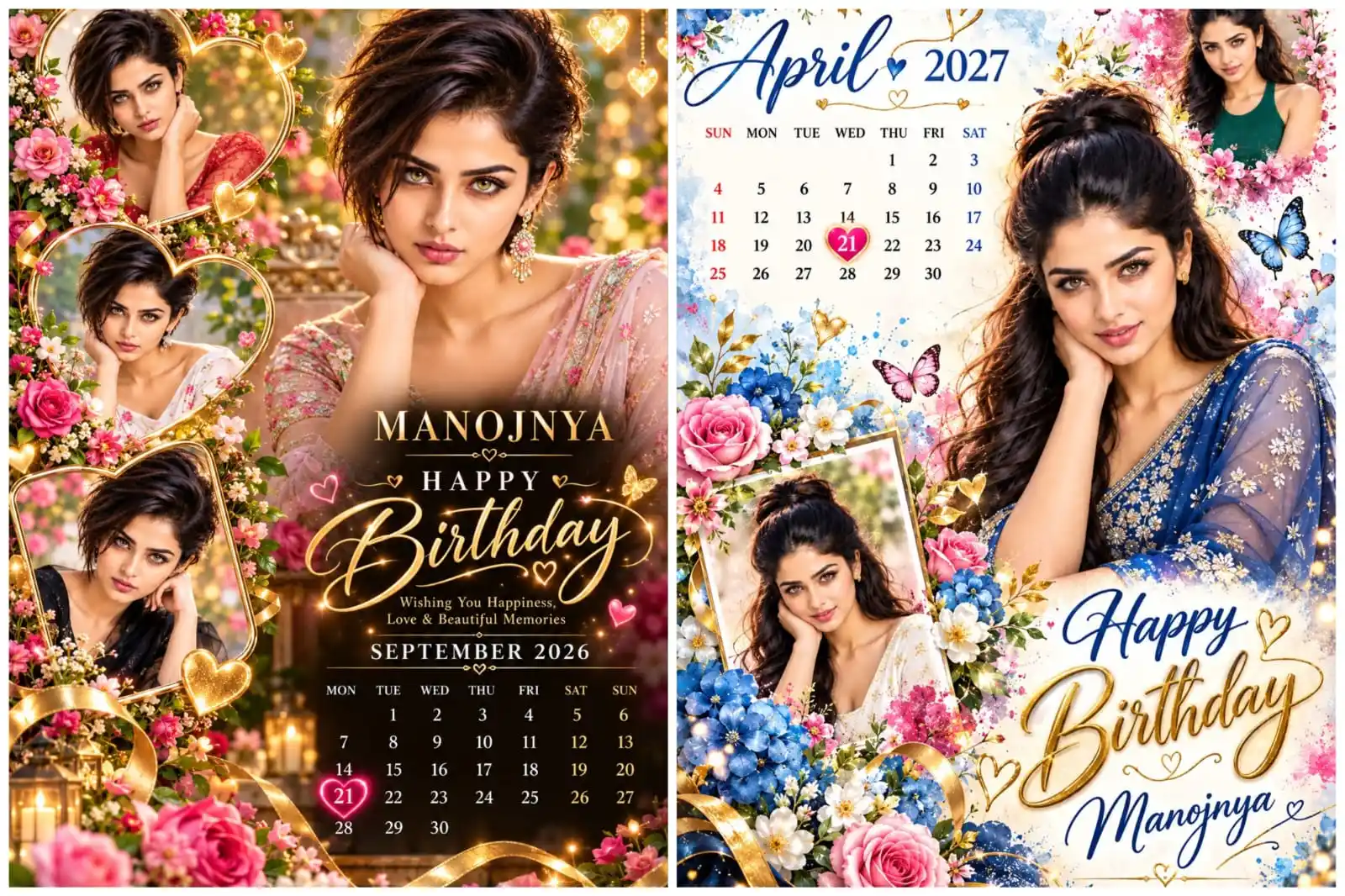
మీ పుట్టినరోజు సందర్భంగా మీ పేరు, ఫోటోలతో ప్రత్యేకమైన బర్త్డే పోస్టర్ తయారు చేసుకోవాలనుకుంటున్నారా? అయితే **AI Birthday Calendar Poster Prompt** మీకు ఉపయోగపడుతుంది. ఈ AI ప్రాంప్ట్ సహాయంతో మీ ఫోటోలను ఉపయోగించి అందమైన బర్త్డే పోస్టర్ను రూపొందించుకోవచ్చు. ఇందులో మీ పేరు, పుట్టిన తేదీ, నెల, సంవత్సరం మార్చుకోవచ్చు. అంతేకాకుండా, మీ పుట్టినరోజు తేదీ క్యాలెండర్లో హార్ట్ సింబల్తో హైలైట్ అయ్యేలా డిజైన్ చేయవచ్చు. ఈ ఆర్టికల్లో ఈ ప్రాంప్ట్ను ఎలా ఉపయోగించాలి, మీ వివరాలను ఎలా మార్చుకోవాలి అనే విషయాలను సులభంగా తెలుసుకుందాం.
AI Birthday Calendar Poster Prompt అంటే ఏమిటి?
AI Birthday Calendar Poster Prompt అనేది మీ ఫోటోలను ఉపయోగించి వ్యక్తిగత బర్త్డే క్యాలెండర్ పోస్టర్ను రూపొందించడానికి ఉపయోగించే ప్రత్యేకమైన సూచనల సమాహారం.
ఈ ప్రాంప్ట్తో మీరు ఈ క్రింది డిజైన్ అంశాలను రూపొందించుకోవచ్చు:
– మీ ఫోటోలతో అందమైన బర్త్డే పోస్టర్.
– మీ పేరుతో ప్రత్యేకమైన బర్త్డే గ్రీటింగ్.
– మీరు ఎంచుకున్న నెల, సంవత్సరానికి సంబంధించిన క్యాలెండర్.
– మీ పుట్టినరోజు తేదీని హార్ట్ సింబల్తో హైలైట్ చేసే డిజైన్.
– పూలు, బటర్ఫ్లైలు, గోల్డ్ ఎఫెక్ట్స్తో ప్రీమియం లుక్.
AI Birthday Calendar Poster Prompt ఎలా ఉపయోగించాలి?
ఈ ప్రాంప్ట్ను ఉపయోగించడానికి కింది స్టెప్స్ను అనుసరించండి.
Step 1: మీరు బర్త్డే పోస్టర్ తయారు చేయాలనుకుంటున్న వ్యక్తికి సంబంధించిన ఫోటోను సిద్ధం చేసుకోండి.
Step 2: మీకు నచ్చిన AI ఇమేజ్ జనరేటర్ను ఓపెన్ చేయండి.
Step 3: ఈ ఆర్టికల్లో ఇచ్చిన పూర్తి AI Birthday Calendar Poster Promptను కాపీ చేయండి.
Step 4: ప్రాంప్ట్లో ఉన్న పేరు, పుట్టిన తేదీ, నెల, సంవత్సరం వివరాలను మీకు కావలసిన విధంగా మార్చండి.
Step 5: మీ ఫోటోను అప్లోడ్ చేసి, మార్చిన ప్రాంప్ట్ను AI టూల్లో పేస్ట్ చేయండి.
Step 6: ఇమేజ్ను జనరేట్ చేయండి. క్యాలెండర్ తేదీలు, పేరు సరిగ్గా ఉన్నాయో లేదో ఒకసారి తనిఖీ చేయండి.
Promptలో మీ పేరును ఎలా మార్చుకోవాలి?
ప్రాంప్ట్లో ఈ లైన్ను గుర్తించండి:
PERSON NAME: MANOJNYA
ఇక్కడ MANOJNYA అనేది ఉదాహరణ పేరు మాత్రమే.
మీ పేరు రవి అయితే ఇలా మార్చండి:
PERSON NAME: RAVI
మీరు ఇచ్చిన పేరును బట్టి పోస్టర్లో ఆ పేరు కనిపించేలా AIకి సూచన ఇవ్వబడుతుంది. పేరు సరైన స్పెల్లింగ్తో వచ్చిందో లేదో చివరగా తనిఖీ చేయండి.
మీ పుట్టిన తేదీని ఎలా మార్చుకోవాలి?
ప్రాంప్ట్లో ఈ లైన్ను గుర్తించండి:
BIRTHDAY DATE: 21
మీ పుట్టినరోజు 15వ తేదీ అయితే ఇలా మార్చండి:
BIRTHDAY DATE: 15
ఇలా మార్చినప్పుడు క్యాలెండర్లో 15వ తేదీని హార్ట్ సింబల్తో హైలైట్ చేయాలని ప్రాంప్ట్ సూచిస్తుంది.
ముఖ్య గమనిక: AI కొన్నిసార్లు తేదీని తప్పుగా చూపించే అవకాశం ఉంది. కాబట్టి చివరగా క్యాలెండర్లో సరైన తేదీ హైలైట్ అయిందో లేదో తనిఖీ చేయండి.
H2: పుట్టిన నెలను ఎలా మార్చుకోవాలి?
ప్రాంప్ట్లో ఈ లైన్ను గుర్తించండి:
BIRTHDAY MONTH: APRIL
మీ పుట్టిన నెల సెప్టెంబర్ అయితే ఇలా మార్చండి:
BIRTHDAY MONTH: SEPTEMBER
మీ పుట్టిన నెల డిసెంబర్ అయితే:
BIRTHDAY MONTH: DECEMBER
మీరు ఎంచుకున్న నెలకు అనుగుణంగా క్యాలెండర్ రూపొందించాలని AIకి సూచించబడుతుంది.
క్యాలెండర్ సంవత్సరాన్ని ఎలా మార్చుకోవాలి?
ప్రాంప్ట్లో ఈ లైన్ను గుర్తించండి:
CALENDAR YEAR: 2027
మీకు 2028 సంవత్సరానికి సంబంధించిన క్యాలెండర్ కావాలంటే ఇలా మార్చండి:
CALENDAR YEAR: 2028
గమనించండి: నెల, సంవత్సరం మార్చినప్పుడు క్యాలెండర్లో తేదీల అమరిక కూడా మారవచ్చు. అందువల్ల ఆ సంవత్సరానికి సరైన క్యాలెండర్ వచ్చిందో లేదో తప్పనిసరిగా తనిఖీ చేయండి.
బర్త్డే క్యాలెండర్ పోస్టర్ను మరింత అందంగా ఎలా తయారు చేసుకోవాలి?
పోస్టర్ను మరింత ఆకర్షణీయంగా రూపొందించడానికి ఈ సూచనలు ఉపయోగపడతాయి.
– మీ ఫోటో స్పష్టంగా ఉండేలా చూసుకోండి.
– పేరు సరిగ్గా టైప్ చేయండి.
– పుట్టిన తేదీ, నెల, సంవత్సరం వివరాలను జాగ్రత్తగా నమోదు చేయండి.
– మీకు నచ్చిన కలర్స్, ఫ్లోరల్ డిజైన్, హార్ట్ ఫ్రేమ్స్ ఎంచుకోండి.
– క్యాలెండర్లో తేదీలు సరిగ్గా ఉన్నాయో తనిఖీ చేయండి.
– ఇమేజ్లో అనవసరమైన లోగోలు, వాటర్మార్కులు రాకుండా ప్రాంప్ట్లో సూచించండి.
AI టూల్ను బట్టి ఫలితాలు మారవచ్చు. అవసరమైతే జనరేట్ చేసిన ఇమేజ్ను మళ్లీ సరిచేసుకోవచ్చు.
Best Image Prompts: AI తో Stunning Images & Videos Create చేసే Ultimate Guide 2026
AI Birthday Calendar Poster Prompt:-
Prompts Link:- Click Me
Prompt 1:-
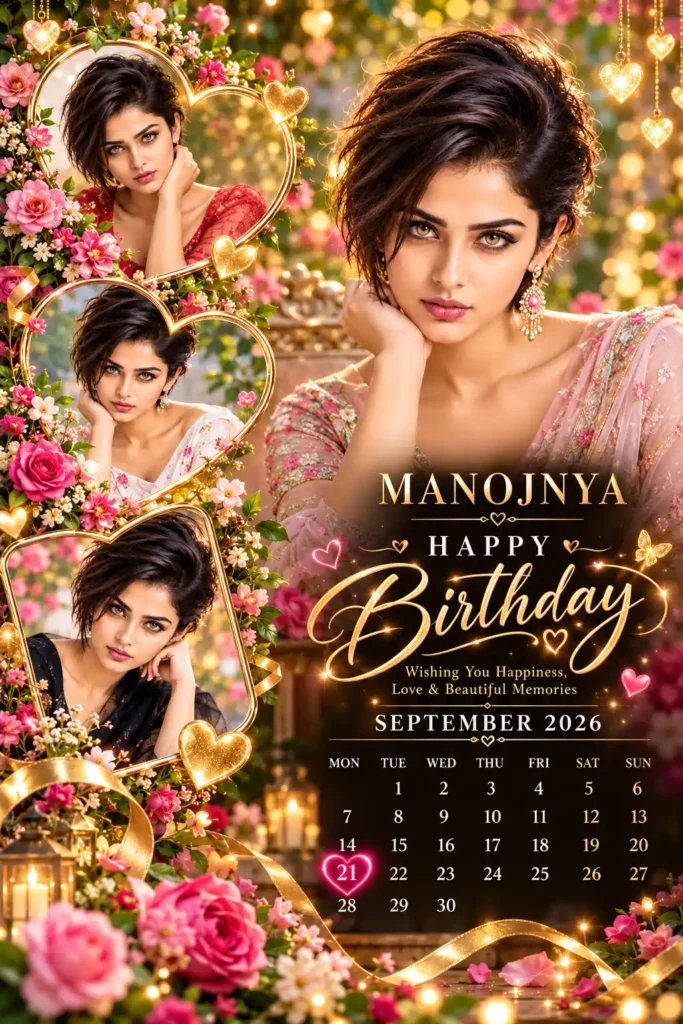
MASTER PROMPT — LUXURY PERSONALIZED BIRTHDAY CALENDAR POSTER
Create one extraordinary, ultra-premium, photorealistic birthday calendar poster personalized for the person whose details are provided below. Design an original, emotionally beautiful, luxury-quality composition with elegant typography, vibrant colors, luminous highlights, realistic photography, and professional graphic design.
1. PERSONALIZATION DETAILS — EDIT THESE VALUES
PERSON NAME: Manojnya
BIRTHDAY DATE: 21
BIRTHDAY MONTH: September
CALENDAR YEAR: 2026
REFERENCE PHOTOS: Use all uploaded photographs of the birthday person.
POSTER LANGUAGE: English
ASPECT RATIO: Vertical 2:3
IMPORTANT: The name, day, month, and year above are editable variables. Replace them with the actual person’s details before generating the poster. Never assume that every person’s birthday is on the 21st or that every calendar should use September 2026.
2. REFERENCE PHOTO AND FACE PRESERVATION
Use the uploaded photographs as the primary visual references for the birthday person.
– Preserve the person’s recognizable facial identity, natural skin tone, facial proportions, eyes, nose, lips, and hairstyle as accurately as possible.
– Use the actual uploaded person instead of inventing a different individual.
– Create one large, beautiful hero portrait and three smaller supporting portraits featuring the same person.
– Give each portrait a different natural pose, expression, or composition while maintaining consistent facial identity.
– Keep the photographs realistic, elegant, and professionally retouched.
– Do not create duplicate-looking copies of the same photograph. Each supporting portrait should have a distinct visual composition.
– Preserve natural skin texture and realistic facial details.
3. UNIQUE LUXURY COMPOSITION
Create a sophisticated birthday poster with an original layout rather than copying an existing template.
MAIN PORTRAIT:
Place one large, beautifully illuminated portrait of the birthday person on the right side, occupying approximately 50–60% of the composition. Use a flattering natural pose, soft cinematic lighting, realistic depth of field, and a premium editorial photography aesthetic.
SUPPORTING PORTRAITS:
Arrange three smaller photographs along the left side using different artistic frames:
– One elegant glowing heart-shaped frame.
– One flowing organic floral frame.
– One artistic asymmetrical frame with delicate golden edges.
Do not use a repetitive square-grid layout. Blend the photographs naturally into the overall composition.
BACKGROUND:
Use a luxurious, softly blurred botanical garden with rich green foliage, warm golden sunlight, delicate pink flowers, and beautiful circular bokeh. Add subtle black, burgundy, and champagne-gold accents where appropriate.
DECORATIVE ELEMENTS:
Add delicate hanging hearts, tiny glowing particles, realistic flowers, elegant golden ribbons, and a few tasteful butterflies. Make the decorative elements complement the photographs rather than overpower them.
Use vibrant pink, champagne gold, warm ivory, and rich botanical green. Maintain clean exposure, realistic colors, beautiful highlights, and premium photographic quality.
4. PERSONALIZED NAME AND BIRTHDAY TYPOGRAPHY
Display the person’s actual name prominently and spell it exactly as provided.
Example:
MANOJNYA
HAPPY BIRTHDAY
Wishing You Happiness, Love & Beautiful Memories
Use the person’s name as an elegant personalized signature, positioned beneath the birthday greeting or integrated into the lower section of the design.
Typography requirements:
– Use refined gold or ivory lettering for the name.
– Use sophisticated, flowing calligraphy for “Happy Birthday.”
– Make the name readable, correctly spelled, and visually balanced.
– Add subtle luminous edges and tasteful golden highlights.
– Keep all text inside the poster boundaries.
– Do not invent additional names, ages, dates, or personal details.
The name and birthday greeting should feel like part of a professionally designed luxury greeting card.
5. AUTOMATIC MONTHLY CALENDAR GENERATION
Generate a complete, accurate calendar using the specified BIRTHDAY MONTH and CALENDAR YEAR.
The calendar must follow the actual Gregorian calendar for the supplied month and year.
Calendar rules:
1. Display the correct month and year prominently.
2. Include all seven weekdays in this order: MON, TUE, WED, THU, FRI, SAT, SUN.
3. Place every date under its correct weekday.
4. Include every valid date in the selected month, without omissions or duplicates.
5. Automatically account for leap years and months containing 28, 29, 30, or 31 days.
6. Never reuse the calendar layout or weekday positions from a different year.
7. Keep the calendar clean, legible, correctly aligned, and easy to read.
8. Do not allow portraits, flowers, ribbons, or decorative effects to obscure the calendar dates.
6. AUTOMATIC BIRTHDAY DATE HIGHLIGHT
The specified BIRTHDAY DATE must be highlighted prominently in the calendar.
For example:
If BIRTHDAY DATE = 21, BIRTHDAY MONTH = September, and CALENDAR YEAR = 2026, highlight September 21, 2026.
Highlight the correct date using a beautiful, luminous pink heart, a delicate golden outline, and a subtle radiant glow.
The heart must surround the actual birthday number without hiding or distorting it.
CRITICAL DATE VALIDATION:
– Highlight only the exact birthday date supplied by the user.
– Calculate its correct position using the actual calendar.
– Never highlight a different date merely to improve the composition.
– If the specified date does not exist in the selected month, request correction instead of silently changing it.
– If the month or year changes, regenerate the entire calendar accordingly.
7. PROFESSIONAL DESIGN AND ORIGINALITY
Create a fresh composition for every new birthday person.
Vary the arrangement of photographs, heart-shaped frames, floral placement, decorative ribbons, lighting, and typography while preserving the premium birthday-calendar concept.
Avoid generic template repetition, copied watermarks, social-media interface elements, and unrelated decorative text.
The final result should resemble a custom-designed luxury birthday photography poster created by an expert graphic designer.
8. FINAL IMAGE QUALITY
Ultra-realistic photography, premium editorial retouching, natural facial details, elegant composition, vibrant colors, luminous highlights, delicate gold detailing, realistic floral textures, beautiful depth of field, crisp typography, balanced lighting, and exceptionally polished presentation.
Create one complete, finished poster in vertical 2:3 format.
9. STRICT NEGATIVE INSTRUCTIONS
NO logos.
NO watermarks.
NO Instagram or Facebook interface elements.
NO usernames or follow buttons.
NO play icons or social-media controls.
NO unwanted text.
NO misspelled names.
NO incorrect calendar dates.
NO incorrect weekday alignment.
NO duplicated calendar numbers.
NO incorrect birthday highlight.
NO square photo-grid layout.
NO distorted faces.
NO artificial-looking skin.
NO random extra people.
NO cropped birthday name.
NO unreadable calendar.
NO unnecessary text overlays.
FINAL OBJECTIVE:
A unique, luxurious, personalized birthday poster featuring the correct person’s photographs, their editable name, the exact birthday month and year, a mathematically correct monthly calendar, and the correct birthday date highlighted with a beautiful glowing heart.
Luxury Birthday Album Prompt – Create a Stunning Photo Album
Prompt 2 :-
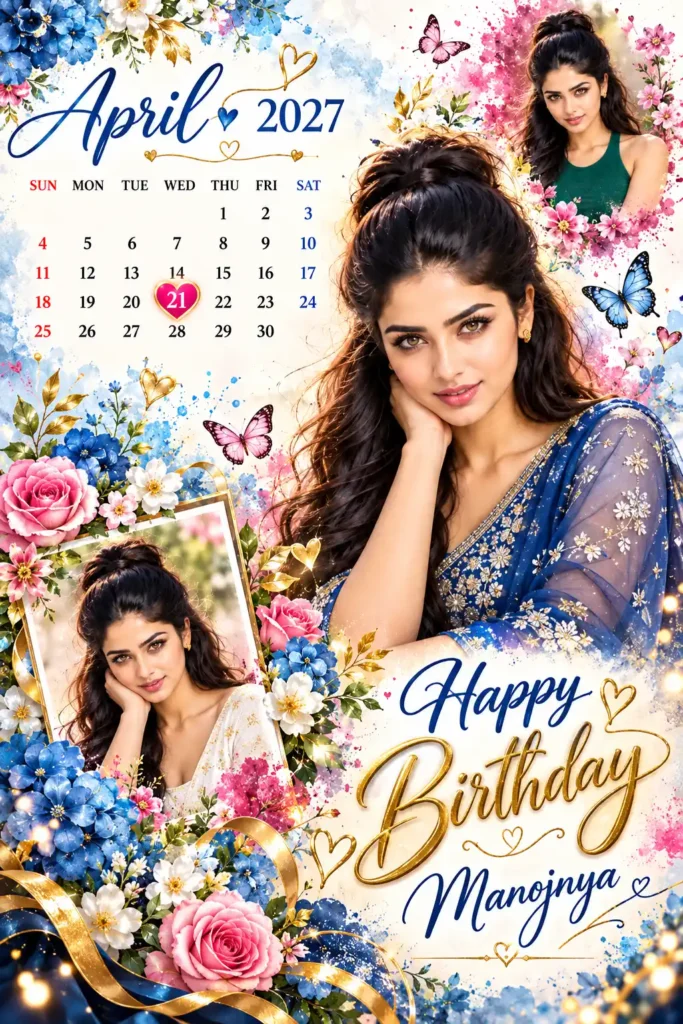
MASTER PROMPT — PREMIUM PERSONALIZED BIRTHDAY CALENDAR POSTER
Create one extraordinary, ultra-premium, photorealistic birthday calendar poster using the uploaded reference photographs of the birthday person. Design a completely original composition with artistic watercolor effects, vibrant floral arrangements, elegant typography, realistic portraits, luminous golden highlights, and luxurious greeting-card aesthetics.
The final image must look like a professionally designed birthday poster, not a generic or duplicated template.
1. EDITABLE PERSONALIZATION DETAILS
PERSON NAME: MANOJNYA
BIRTHDAY DATE: 21
BIRTHDAY MONTH: APRIL
CALENDAR YEAR: 2027
REFERENCE PHOTOS: Use the uploaded photograph or photographs of the birthday person.
POSTER LANGUAGE: English
ASPECT RATIO: Vertical 2:3
IMPORTANT: These are sample values. Before generating an image, replace the name, birthday date, month, and year with the actual person’s details. All four fields must be editable.
2. REFERENCE FACE PRESERVATION
Use the uploaded photograph as the primary facial identity reference.
– Preserve the person’s recognizable face, natural skin tone, facial proportions, eyes, eyebrows, nose, lips, and hairstyle.
– Do not replace the reference person with a different individual.
– Create one large central portrait and two smaller supporting portraits featuring the same person.
– Maintain consistent facial identity across all portraits.
– Give each portrait a different natural pose and expression while preserving the person’s recognizable appearance.
– Use realistic skin texture, detailed eyes, natural hair, and professional photographic lighting.
– Avoid artificial skin smoothing, distorted facial features, or exaggerated beauty filters.
3. UNIQUE WATERCOLOR ART DIRECTION
Create an elegant, colorful, artistic birthday poster inspired by luxury watercolor illustration and premium editorial photography.
BACKGROUND:
Use a beautiful warm ivory and white watercolor-paper background with soft blue watercolor washes, delicate pink splashes, subtle golden particles, and flowing artistic paint textures.
COLOR PALETTE:
– Royal blue
– Sapphire blue
– Blush pink
– Magenta
– Warm ivory
– Champagne gold
– Soft botanical green
Use vibrant colors, luminous highlights, and realistic details without excessive HDR or muddy shadows.
4. ORIGINAL PHOTO COMPOSITION
MAIN PORTRAIT:
Place a large, beautifully detailed portrait of the birthday person in the center-right area. The person should wear an elegant traditional Indian outfit, such as a richly embroidered royal-blue saree or another tasteful outfit suitable for the reference person.
Use a natural pose, a gentle smile, realistic fabric details, and beautiful soft lighting.
SUPPORTING PORTRAITS:
Arrange two smaller portraits in different areas of the poster:
– One in the upper-right area, surrounded by a soft pink watercolor splash.
– One in the lower-left area, blended into a delicate floral watercolor arrangement.
Make each supporting portrait visually distinct. Use different crops, natural poses, and artistic framing.
Do not arrange the photographs in a repetitive square grid.
Blend the portrait edges naturally into watercolor splashes while keeping the face sharp, realistic, and recognizable.
5. PREMIUM FLORAL DECORATION
Surround the portraits with beautifully detailed flowers, including blue hydrangeas, pink roses, white blossoms, lavender flowers, and delicate green foliage.
Add:
– Elegant butterflies with realistic wing details.
– Small golden heart accents.
– Delicate gold ribbons.
– Fine golden botanical branches.
– Subtle luminous particles.
– Soft watercolor splashes around the portrait edges.
Keep the decorations balanced and sophisticated. Do not cover the person’s face or the calendar.
Every new poster should have a fresh arrangement of flowers, colors, frames, and decorative elements.
6. PERSONALIZED BIRTHDAY NAME AND GREETING
Display the exact name supplied in the personalization details.
Example:
MANOJNYA
HAPPY BIRTHDAY
Wishing You a Beautiful Year Filled with Happiness, Love & Wonderful Memories
Place the birthday greeting prominently in the lower-right area, using elegant flowing calligraphy.
Display the person’s name in a refined, readable font with a deep-blue or champagne-gold finish.
Typography requirements:
– Spell the supplied name exactly.
– Keep all text within the image boundaries.
– Use beautiful, professional lettering.
– Make “Happy Birthday” the main greeting.
– Use tasteful gold highlights and subtle luminous edges.
– Maintain sufficient contrast between text and background.
– Do not add an age or additional personal information unless explicitly supplied.
7. AUTOMATIC MONTHLY CALENDAR
Generate a complete Gregorian calendar based on the supplied BIRTHDAY MONTH and CALENDAR YEAR.
For the sample values:
BIRTHDAY MONTH: APRIL
CALENDAR YEAR: 2027
Display “APRIL 2027” prominently in the upper-left area.
The calendar must be mathematically accurate.
CALENDAR REQUIREMENTS:
1. Display all seven weekdays in this order: SUN, MON, TUE, WED, THU, FRI, SAT.
2. Place each date under its correct weekday.
3. Include every valid date in the month exactly once.
4. Automatically account for the actual number of days in the selected month.
5. Correctly handle leap years.
6. Recalculate the entire calendar whenever the month or year changes.
7. Use clean, readable typography with consistent spacing.
8. Do not overlap dates with flowers, portraits, butterflies, or decorative elements.
9. Ensure that all dates are visible and legible.
10. Never reuse weekday positions from another month or year.
Keep the calendar in the upper-left section, using a clean ivory background so the numbers remain easy to read.
8. AUTOMATIC BIRTHDAY DATE HIGHLIGHT
Highlight the exact BIRTHDAY DATE supplied by the user.
SAMPLE VALUES:
PERSON NAME: MANOJNYA
BIRTHDAY DATE: 21
BIRTHDAY MONTH: APRIL
CALENDAR YEAR: 2027
For these sample values, highlight April 21, 2027.
Use a beautiful pink heart surrounding the number 21, with a delicate golden edge and a subtle luminous glow.
The highlighted number must remain completely readable.
CRITICAL RULES:
– Highlight only the specified birthday date.
– Calculate its correct position using the actual calendar.
– Do not highlight a neighboring date.
– Do not move the date to improve the design.
– If the supplied date is invalid for the selected month, request correction.
– When the birthday month or year changes, regenerate the calendar and birthday highlight accordingly.
9. ORIGINALITY AND PROFESSIONAL FINISH
Create a distinctive composition for each person.
Vary the portrait arrangement, watercolor patterns, floral placement, decorative butterflies, background textures, and typography while preserving the overall premium birthday-calendar concept.
Do not reproduce an existing poster pixel-for-pixel. Create an original design using the same broad concept of personalized portraits, a monthly calendar, and a birthday greeting.
Maintain a harmonious composition with realistic photography and artistic watercolor details.
10. FINAL IMAGE QUALITY
Ultra-realistic portrait photography, premium watercolor artistry, vibrant blue and pink colors, elegant gold detailing, realistic floral textures, beautiful natural skin, crisp facial details, sophisticated typography, clean calendar alignment, luminous highlights, and professional graphic-design quality.
Create one complete, finished birthday calendar poster in vertical 2:3 format.
11. STRICT NEGATIVE INSTRUCTIONS
NO logos.
NO watermarks.
NO social-media interface elements.
NO usernames.
NO play buttons.
NO follow buttons.
NO unwanted text.
NO misspelled names.
NO incorrect calendar dates.
NO incorrect weekday alignment.
NO duplicated numbers.
NO incorrect birthday highlight.
NO distorted faces.
NO unrelated people.
NO square-grid photo layout.
NO unreadable typography.
NO cropped name.
NO covered calendar dates.
NO excessive HDR.
NO messy composition.
FINAL OBJECTIVE:
Create a unique, luxury-quality birthday calendar poster featuring the actual reference person, a large central portrait, two supporting portraits, colorful watercolor flowers, elegant blue-and-gold typography, the person’s editable name, the correct birthday month and year, and the exact birthday date highlighted with a beautiful pink heart.
Conclusion (ముగింపు):-
AI Birthday Calendar Poster Prompt ఉపయోగించి మీ ఫోటోలు, పేరు, పుట్టిన తేదీతో ప్రత్యేకమైన బర్త్డే క్యాలెండర్ పోస్టర్ను రూపొందించుకోవచ్చు. మీకు కావలసిన నెల, సంవత్సరం మార్చుకోవడంతో పాటు, క్యాలెండర్లో మీ పుట్టినరోజు తేదీని హార్ట్ సింబల్తో హైలైట్ చేయవచ్చు. ఈ ప్రాంప్ట్ను ఉపయోగించే ముందు మీ వ్యక్తిగత వివరాలను సరిగ్గా నమోదు చేయండి. ఇమేజ్ జనరేట్ అయిన తర్వాత పేరు, క్యాలెండర్ తేదీలు, వారాల అమరికను ఒకసారి తనిఖీ చేయండి. మీ సృజనాత్మకతకు అనుగుణంగా డిజైన్ను మార్చుకుంటూ మీకు నచ్చిన ప్రత్యేకమైన బర్త్డే పోస్టర్ను తయారు చేసుకోవచ్చు.
FAQs – Frequently Asked Questions
1. AI Birthday Calendar Poster Prompt అంటే ఏమిటి?
AI Birthday Calendar Poster Prompt అనేది మీ ఫోటో, పేరు, పుట్టిన తేదీ, నెల, సంవత్సరాన్ని ఉపయోగించి వ్యక్తిగత బర్త్డే క్యాలెండర్ పోస్టర్ను రూపొందించడానికి ఉపయోగించే టెక్స్ట్ సూచనల సమాహారం.
2. ఈ ప్రాంప్ట్లో నా పేరును మార్చుకోవచ్చా?
అవును. ప్రాంప్ట్లోని PERSON NAME దగ్గర ఉన్న ఉదాహరణ పేరును తొలగించి, మీ పేరును నమోదు చేయవచ్చు. ఇమేజ్ జనరేట్ చేసిన తర్వాత పేరు స్పెల్లింగ్ సరిగ్గా ఉందో లేదో తనిఖీ చేయండి.
3. నా పుట్టినరోజు తేదీని ఎలా హైలైట్ చేయాలి?
ప్రాంప్ట్లోని BIRTHDAY DATE దగ్గర మీ పుట్టిన తేదీని నమోదు చేయండి. ఉదాహరణకు, మీ పుట్టినరోజు 15వ తేదీ అయితే BIRTHDAY DATE: 15 అని మార్చండి. క్యాలెండర్లో ఆ తేదీ హార్ట్ సింబల్తో హైలైట్ అయ్యేలా ప్రాంప్ట్ సూచిస్తుంది.
4. బర్త్డే క్యాలెండర్ నెల, సంవత్సరాన్ని మార్చవచ్చా?
అవును. BIRTHDAY MONTH దగ్గర మీ నెలను, CALENDAR YEAR దగ్గర మీకు కావలసిన సంవత్సరాన్ని నమోదు చేయండి. కొత్త నెల, సంవత్సరానికి అనుగుణంగా క్యాలెండర్ రూపొందించాలని AIకి సూచించండి.
5. ఈ బర్త్డే పోస్టర్ను రూపొందించడానికి నా ఫోటో అవసరమా?
మీ ఫోటోతో వ్యక్తిగత పోస్టర్ కావాలంటే ఫోటోను అప్లోడ్ చేయడం మంచిది. ఫోటో లేకుండా కూడా సాధారణ బర్త్డే పోస్టర్ను రూపొందించవచ్చు, కానీ అది మీ అసలు ముఖాన్ని ప్రతిబింబించదు.
6. ఈ ప్రాంప్ట్ను ఏ AI ఇమేజ్ జనరేటర్లో ఉపయోగించవచ్చు?
ఫోటో అప్లోడ్ చేసి, టెక్స్ట్ ప్రాంప్ట్ ద్వారా ఇమేజ్ రూపొందించడానికి అనుమతించే AI ఇమేజ్ జనరేటర్లలో దీనిని ప్రయత్నించవచ్చు. అందుబాటులో ఉన్న ఫీచర్లు ఒక్కో టూల్లో వేర్వేరుగా ఉండవచ్చు.
7. AI క్యాలెండర్లో తేదీలు తప్పుగా వస్తే ఏం చేయాలి?
AI కొన్నిసార్లు క్యాలెండర్ తేదీలు లేదా వారాల అమరికలో తప్పులు చేయవచ్చు. కాబట్టి మీరు ఎంచుకున్న నెల, సంవత్సరానికి సంబంధించిన క్యాలెండర్ను ధృవీకరించండి. తప్పులు ఉంటే ఇమేజ్ను సవరించండి లేదా క్యాలెండర్ను విడిగా తయారు చేసి పోస్టర్లో చేర్చండి.
8. ప్రతి వ్యక్తికి కొత్త డిజైన్ రూపొందించుకోవచ్చా?
అవును. కొత్త ఫోటోలు, పేరు, పుట్టిన తేదీ, నెల, సంవత్సరం ఇవ్వడంతో పాటు, రంగులు, ఫ్రేమ్లు, పూల అమరిక వంటి డిజైన్ సూచనలను మార్చుకోవచ్చు. ఇలా చేయడం ద్వారా ప్రతి వ్యక్తికి ప్రత్యేకమైన పోస్టర్ను రూపొందించవచ్చు.
9. ఈ AI బర్త్డే క్యాలెండర్ పోస్టర్ను సోషల్ మీడియాలో పోస్ట్ చేయవచ్చా?
అవును. రూపొందించిన పోస్టర్ను Instagram, Facebook, WhatsApp వంటి ప్లాట్ఫారమ్లలో పంచుకోవచ్చు. పోస్ట్ చేసే ముందు ఫోటోను ఉపయోగించడానికి అనుమతి ఉందో లేదో, పేరు మరియు తేదీ వివరాలు సరిగ్గా ఉన్నాయో లేదో నిర్ధారించుకోండి.