
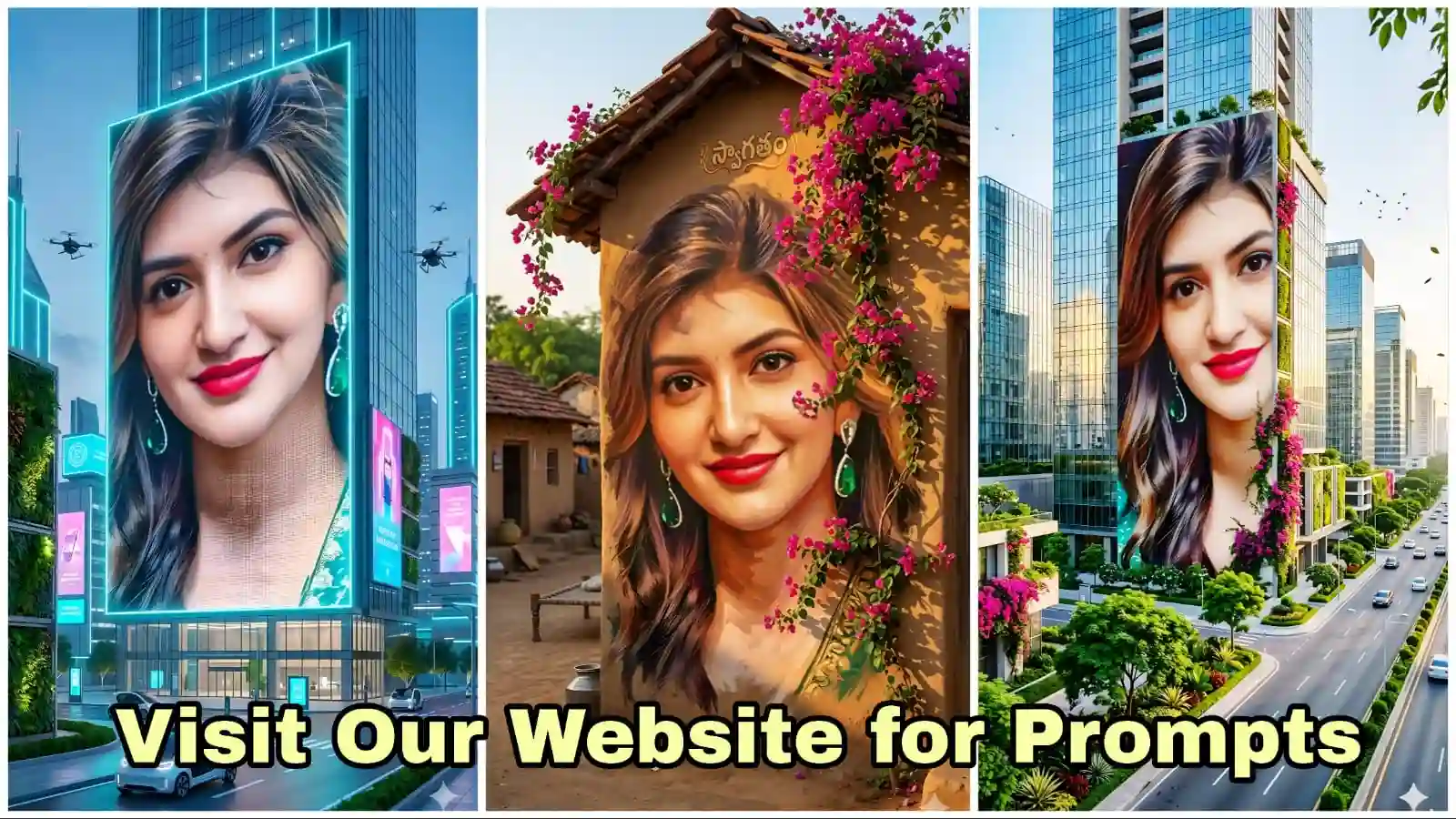
Best Image Prompts: AI Images & Cinematic Videos Create చేసే Complete Guide (Gemini + AI Video Tools)
AI tools వల్ల ఇప్పుడు ఎవరికైనా Professional level visuals create చేయడం చాలా easy అయింది. ముఖ్యంగా image prompts ఉపయోగిస్తే simple text తోనే cinematic images మరియు realistic videos create చేయవచ్చు.
ఈ Post లో మీరు Powerful image prompts ఎలా ఉపయోగించాలి, అలాగే AI image ని video గా ఎలా convert చేయాలి అనే పూర్తి process నేర్చుకుంటారు.
ఈ guide చదివిన తర్వాత మీరు కూడా:
- Futuristic city posters
- Giant building billboards
- Cinematic AI scenes
- Image to video animations
ఇవన్నీ చాలా easyగా create చేయగలుగుతారు.
Image Prompts ఉపయోగించి AI Images ఎలా Create చేయాలి
AI image generate చేయడానికి మీరు చేయాల్సింది చాలా simple. కింద చెప్పిన steps follow చేస్తే చాలు.
Step-by-Step Guide
1️⃣ ముందుగా Image Prompt ను copy చేసుకోండి.
2️⃣ తర్వాత మీ మొబైల్లో Gemini App open చేయండి.
3️⃣ Gemini open చేసిన తర్వాత Pro Mode select చేయండి.
4️⃣ ఇప్పుడు Create Image / Generate Image option పై click చేయండి.
5️⃣ మీరు copy చేసిన image prompt ను అక్కడ paste చేయండి.
6️⃣ Generate button click చేయగానే AI మీకు high quality image create చేసి చూపిస్తుంది.
ఇలా మీరు చాలా different styles లో images create చేయవచ్చు.
ఉదాహరణకు:
- Futuristic city billboard
- Cyberpunk poster
- Giant building advertisement
- Cinematic environment scenes
ఇవి అన్నీ image prompts ద్వారా create అవుతాయి.
Image ను Video గా ఎలా Convert చేయాలి
AI image create చేసిన తర్వాత దాన్ని cinematic video గా convert చేయడం కూడా చాలా easy.
Step-by-Step Video Creation Guide
1️⃣ ముందుగా మీరు create చేసిన AI Image ను download చేసుకోండి.
2️⃣ ఇప్పుడు Hailuo AI website (image to video tool) open చేయండి.
3️⃣ అక్కడ Sign Up / Login చేయండి.
4️⃣ Login అయిన తర్వాత left side లో ఉన్న three lines (menu icon) పై click చేయండి.
5️⃣ అక్కడ Create / Generate Video option select చేయండి.
6️⃣ తర్వాత Image Upload icon (picture symbol) పై click చేసి మీరు create చేసిన image upload చేయండి.
7️⃣ ఇప్పుడు మీ Video Prompt ను paste చేయండి.
8️⃣ Generate button click చేయండి.
కొన్ని seconds లోనే AI మీ image ను realistic cinematic video గా convert చేస్తుంది.
ఈ videos లో:
- Cars moving on roads
- Drones flying in sky
- Trees moving in wind
- Animated advertisements
ఇలా realistic motion కనిపిస్తుంది.
Modern City Building Giant Mural AI Image Prompt
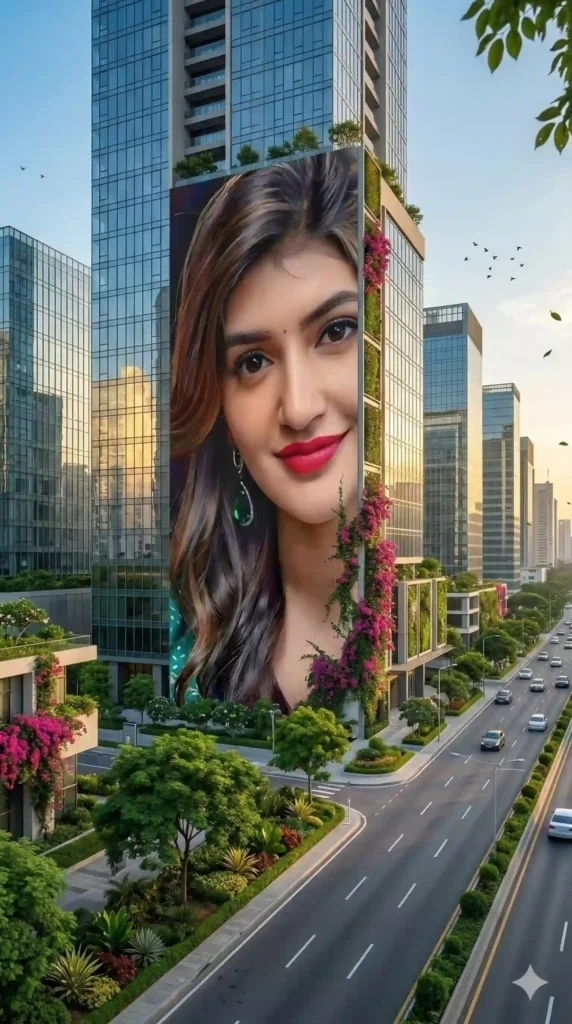
Image Prompt 1:
Use the uploaded mural image as the reference portrait and recreate the same painting concept on a massive modern city building.
The portrait must preserve the exact face, expression, identity, and painting style from the reference image. The mural should appear as a giant hand-painted artwork on the exterior wall of a tall, luxury high-class building in a modern city.
The mural should be extremely large, covering several floors of the building, looking like a professionally commissioned urban street mural painted by world-class mural artists.
The building should be located beside a wide modern highway road with light traffic moving in the distance.
Surround the area with beautiful urban greenery: • landscaped trees
• decorative plants
• green bushes
• modern city park elements
The environment should feel like a clean, high-end city district with modern architecture, glass buildings, and well-maintained surroundings.
Add vibrant bougainvillea flowers naturally growing near the building or on decorative vertical garden structures so the scene keeps the colorful floral beauty from the original village concept.
Lighting should be cinematic golden sunlight reflecting from the glass buildings and softly illuminating the mural.
Create a strong sense of scale so the mural feels monumental and impressive when viewed from the street.
Add subtle real-life city atmosphere: • distant vehicles on the highway
• soft wind moving tree leaves
• birds flying across the skyline
• sunlight reflections on nearby buildings
The mural must look like it is physically painted on the building wall with realistic brush textures and paint depth, not digitally pasted.
Camera perspective: A slightly low cinematic angle from the highway side, making the building and mural appear grand and powerful.
Style: ultra realistic urban mural photography
Quality: 8K hyper-detailed textures
Lighting: cinematic warm daylight
Aspect Ratio: 9:16 vertical
Video Prompt :
Use the provided city billboard image as the base frame and convert it into a realistic cinematic video.
The giant portrait billboard on the building must remain completely static. The face, expression, and poster must not move or animate in any way. It should look like a real printed or LED advertisement fixed on the building.
Animate only the environment to create a lively modern city scene.
Street activity:
• Cars and vehicles smoothly driving along the highway road in both directions
• Occasional vehicles passing closer to the camera creating realistic motion
• Subtle reflections from moving cars on the road surface
Natural environment motion:
• Trees and plants along the roadside gently swaying in the wind
• Leaves slightly moving naturally
• Soft wind movement in the hanging bougainvillea plants on the building
Sky activity:
• A commercial airplane slowly flying across the sky in the distance
• Small birds occasionally flying between buildings
Atmosphere and lighting:
• Bright natural daylight with soft cinematic sunlight
• Subtle moving shadows from trees and buildings
• Light reflections shifting across the glass skyscrapers
• A calm modern city atmosphere with realistic depth and perspective
Camera movement:
A slow cinematic drone-style movement looking slightly down toward the road and buildings, creating a natural city documentary feeling.
Important rule:
The giant portrait billboard must remain perfectly still throughout the entire video.
Style: ultra realistic modern city environment
Motion: natural city life movement
Lighting: bright cinematic daylight
Quality: high realism, detailed animation
Duration: 5–8 seconds
Aspect Ratio: 9:16
Subtle atmospheric depth, light wind simulation, realistic motion blur on moving vehicles, and soft environmental sound feeling like a real city morning.
Best AI Photo Editing Prompts: మీ ఫోటోతో Cinematic Poster ఎలా క్రియేట్ చేయాలి 2026
Village Wall Painting AI Image Prompt
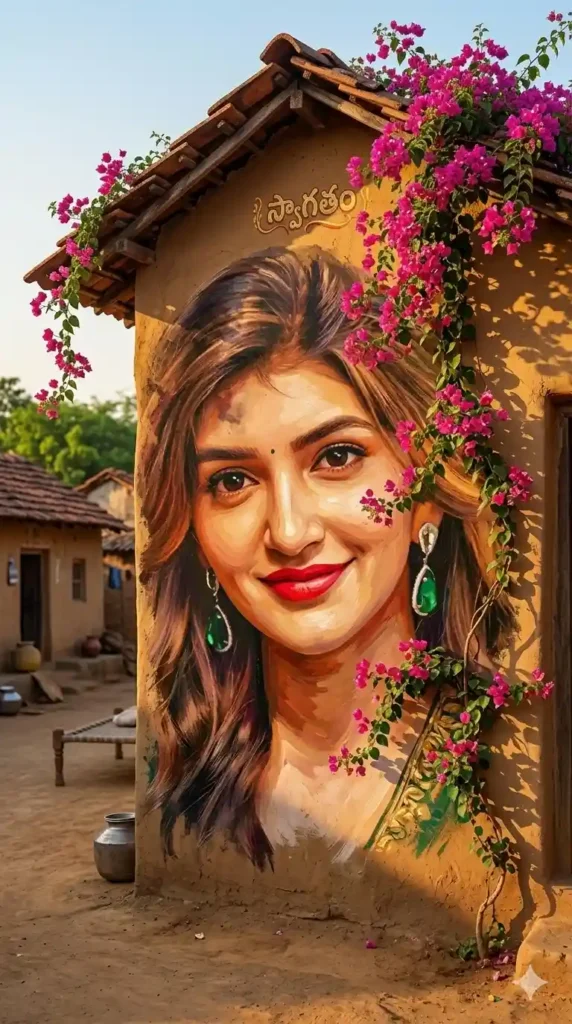
Image Prompt 2:
Create a highly detailed, ultra-realistic hand-painted village mural artwork using the uploaded reference photo. The mural must perfectly preserve the exact facial identity, expression, and proportions of the person from the reference image — absolutely no facial changes or identity distortion.
Transform the portrait into a large traditional brush-painted wall mural on an aged rustic village house wall. The artwork should look like it was painted by a skilled mural artist using visible brush strokes, layered pigments, and natural paint texture blending into the rough wall surface.
The wall should have authentic rural textures such as slightly cracked lime plaster, weathered mud tones, faded paint, and subtle natural imperfections that enhance realism.
From the roof above the mural, add lush cascading vibrant pink bougainvillea flowers with rich green leaves flowing naturally around the mural composition, partially wrapping around the portrait frame.
Create a peaceful Indian rural village street environment around the mural including: • traditional mud houses
• terracotta clay roof tiles
• warm golden morning sunlight
• earthy village color tones
• soft natural shadows
• subtle dust particles glowing in sunlight
• greenery and small plants near the wall base
Lighting should feel cinematic yet natural, with warm sunlight illuminating the mural and creating soft realistic shadows across the textured wall.
Ensure the mural appears physically painted on the wall rather than digitally pasted. Paint colors should interact naturally with the wall texture, showing pigment absorption, brush irregularities, and authentic mural depth.
Use a color palette of warm rural earth tones, vibrant bougainvillea pinks, fresh greens, and sunlit highlights to create a bright and authentic village atmosphere.
Maintain extreme realism with artistic mural texture so the scene feels like a real wall painting in a living village street.
Add subtle cinematic depth and environmental storytelling to make the scene immersive and visually rich.
At the bottom of the mural wall include an optional hand-painted name area. If a name is provided, render it as a natural brush-painted signature integrated into the mural artwork as if the artist painted the name directly onto the wall.
Aspect Ratio: 9:16 vertical
Style: Ultra Realistic Rural Wall Mural, Hand Painted Brush Art, Cinematic Natural Lighting
Quality: 8K, extremely detailed textures, realistic wall paint interaction
Custom Name (optional): [XXXXXX]
Video Prompt :
Use the provided mural image as the base frame and animate it into a short cinematic video while preserving the wall painting exactly as it is.
The portrait on the wall must remain completely static like a real painted mural. The face, expression, and painting texture should not move or animate in any way. It must look like a real hand-painted wall portrait.
Animate only the natural environment around the mural to create a peaceful living village atmosphere.
The bougainvillea flowers and leaves hanging from the roof should gently sway in the soft village breeze with realistic natural movement.
Add a few small birds flying across the sky in the background of the village street, crossing the frame naturally from one side to another.
A colorful butterfly should slowly enter the scene, flutter gracefully in front of the wall for a moment, and then softly land on one of the bougainvillea branches above the mural.
Add subtle environmental life:
• soft wind movement in leaves
• distant birds flying in the sky
• gentle sunlight shifting slightly across the wall
• tiny dust particles glowing in the sunlight
The mural painting itself must remain perfectly still, preserving the exact look of a real brush-painted wall portrait.
Lighting should feel warm and cinematic, like a calm golden morning in an Indian village.
The environment should feel authentic and peaceful with mud houses, clay roof tiles, greenery, and natural sunlight.
Camera movement:
Start with a slow cinematic push-in toward the mural as if a traveler is walking through the village street and noticing the beautiful wall painting.
Style: ultra realistic cinematic village atmosphere
Motion: subtle natural movements only in environment
Portrait: completely static mural painting
Quality: high detail, realistic lighting, natural motion
Aspect Ratio: 9:16
Video Duration: 5–8 seconds
At the end of the video, the butterfly briefly sits above the mural name text and then flies away, leaving a calm cinematic frame of the mural.
Couple Photo Poster Maker Online Free  Valentine Love Poster With Your Photo & Name
Futuristic City LED Billboard AI Image Prompt
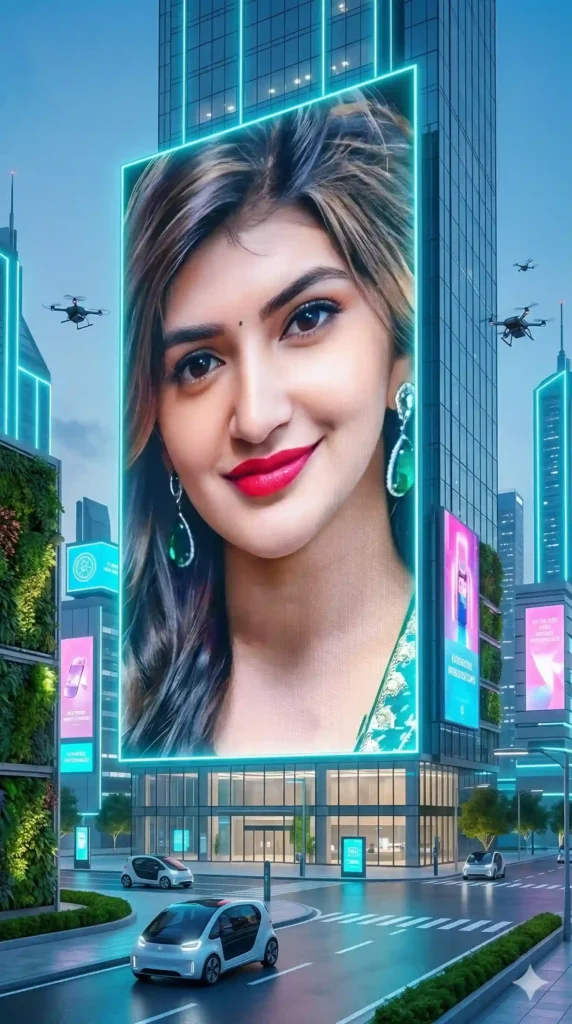
Image Prompt 3:
Use the uploaded face image as the main reference and display it as a massive futuristic LED billboard poster on a luxury skyscraper in a bright high-tech futuristic city.
The face must remain exactly the same identity and expression as the reference image, but it should appear as a crystal-clear ultra-realistic digital billboard advertisement instead of a painted mural.
The billboard should look like a giant ultra-HD LED screen covering several floors of a futuristic skyscraper.
Remove all painting textures. The face should look like a high-end professional photo displayed on a huge LED advertising screen.
Create a bright futuristic city environment instead of a dark cyberpunk atmosphere.
Scene environment: • ultra modern skyscrapers with glass and metal architecture
• bright neon light accents in cyan, blue, magenta and white
• glowing futuristic billboards on nearby buildings
• wide clean futuristic roads with luxury cars
• green futuristic vertical gardens on buildings
Lighting should be bright and cinematic with strong glowing highlights, reflections on glass buildings, and vibrant futuristic colors.
Add a powerful shining LED glow coming from the billboard screen so the portrait looks vibrant and eye-catching like a premium advertisement in a futuristic city center.
Include subtle futuristic elements: • flying drones moving between buildings
• sleek futuristic vehicles on the road
• soft glowing light reflections on wet streets
Camera perspective: A cinematic street-level view looking up at the skyscraper, making the LED billboard poster appear enormous and impressive.
The final image must feel like a real futuristic city advertisement display — clean, modern, bright, and ultra realistic.
Style: ultra realistic futuristic city photography
Poster style: giant LED billboard advertisement
Lighting: bright cinematic glow, vibrant neon highlights
Quality: 8K hyper detailed
Aspect Ratio: 9:16
Video Prompt:
Use the provided futuristic city billboard image as the base frame and animate it into a cinematic vertical video while preserving the main LED billboard portrait exactly as it is.
The large central LED billboard poster must remain completely static and unchanged. The face, expression, and billboard image must not animate or move in any way. It should look like a real digital advertisement screen displaying a still image.
Animate only the environment and surrounding elements to bring the futuristic city to life.
Add smooth cinematic environmental motion:
• Several futuristic drones flying horizontally across the scene at different distances from the camera
• One drone slowly passing in front of the skyscraper while scanning the city with a soft blue light beam
• Other drones flying between buildings in the background
The three side advertisement screens on nearby buildings should be animated like real digital ads:
• each screen plays different futuristic advertisements
• smooth transitions between ads
• glowing neon animations and moving graphics
• subtle light flicker and LED screen refresh effects
Add futuristic city atmosphere:
• sleek autonomous cars moving slowly on the road
• traffic lights changing colors
• glowing reflections on the glass buildings
• subtle wind movement in the vertical garden plants
• soft moving light reflections on the street
Lighting should be bright, futuristic, and vibrant with glowing cyan, magenta, and white neon accents reflecting across the city.
Camera movement:
Start with a very slow cinematic push-in toward the skyscraper, making the giant billboard feel monumental and impressive.
The animation should feel like a real futuristic city advertisement district similar to a high-end smart city center.
Important rule:
The main giant billboard portrait must remain perfectly still throughout the video like a real advertisement display.
Style: ultra realistic futuristic city cinematic animation
Lighting: bright neon glow with reflections
Quality: ultra detailed, high realism
Duration: 5–8 seconds
Aspect Ratio: 9:16
Cinematic atmosphere with soft volumetric light beams, subtle lens reflections, and realistic LED glow from the billboard illuminating the surrounding building surface.
Explore Google Gemini here:
https://gemini.google.com/
Conclusion
AI image prompts are becoming one of the most powerful tools for creators, bloggers, and content makers. With the right prompts, anyone can generate cinematic images and transform them into stunning videos within minutes.
By combining Gemini AI for image generation and AI video tools for animation, creators can produce professional-quality visuals without expensive software.
If you experiment with different image prompts, you can easily create viral content for YouTube Shorts, Instagram Reels, and social media platforms.
FAQ
What are image prompts?
Image prompts are text instructions given to AI tools to generate images based on the description.
Which AI tool is best for image generation?
Gemini AI, Midjourney, and other AI tools are commonly used for creating high quality AI images.
Can AI images be converted into videos?
Yes. Using AI video tools like Hailuo AI or Runway, images can be animated into short cinematic videos.
Are image prompts useful for social media content?
Yes. Creators use image prompts to generate viral visuals for YouTube Shorts, Instagram Reels, and digital marketing.
Do I need design skills to use image prompts?
No. Anyone can generate professional visuals by simply copying and pasting the right prompts.


3 thoughts on “Best Image Prompts: AI తో Stunning Images & Videos Create చేసే Ultimate Guide 2026”